
Google Pics Access: Getting Into the Google Workspace AI Image Editor Built on Nano Banana
Google Pics — the Google Workspace AI image editor built on Nano Banana, Google’s image generation model — became generally available on 1 September 2026, but “generally available” and “available to you today” are not the same thing. Eligibility is decided by your subscription, the calendar is decided by which release track your domain sits on, and a domain administrator can switch the whole thing off. The Workspace Updates rollout post sets out that schedule; this page explains what it means in practice.
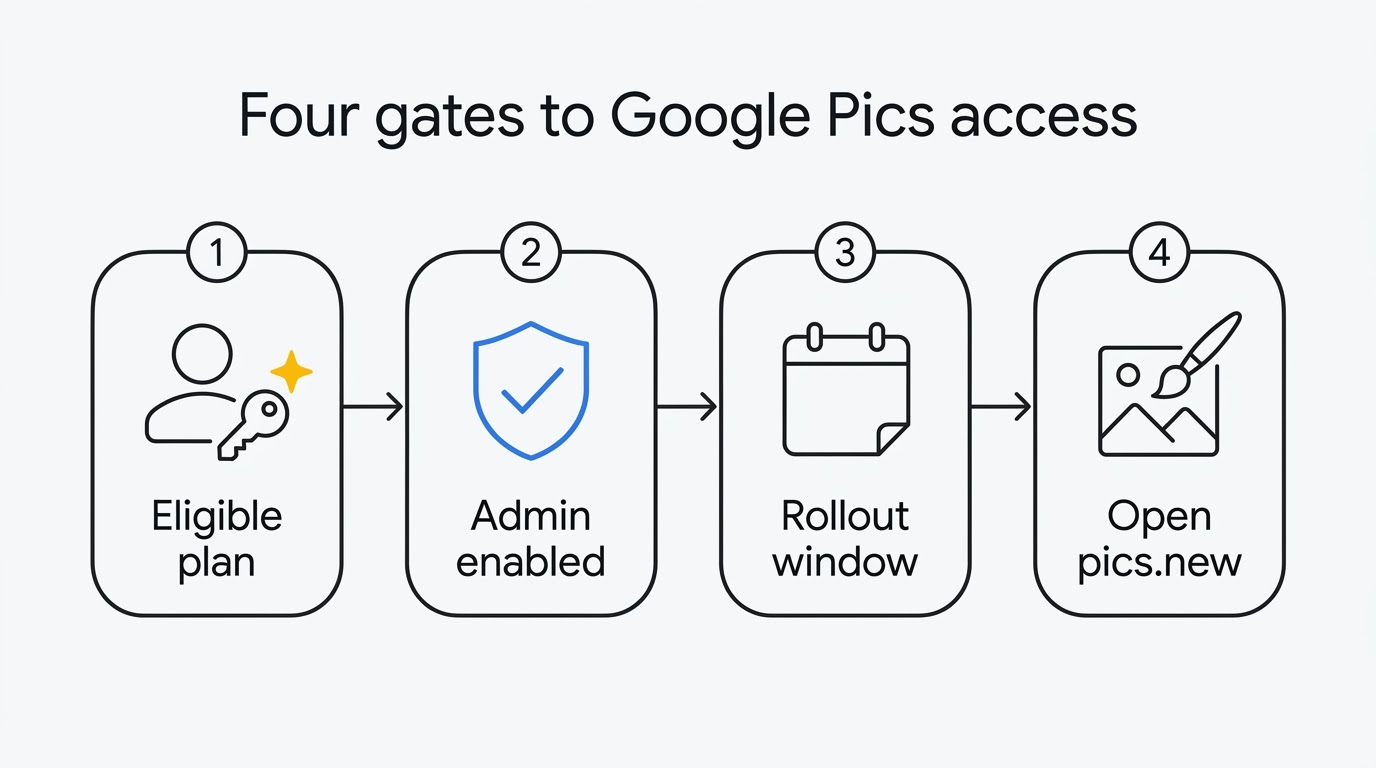
Everything about Google Pics starts at the same door: sign in and open pics.new. If the editor loads, you have access and the rest of this page is reference material. If it does not, one of five specific things is in the way.
Who is eligible for Google Pics
Access follows a paid subscription, on either a personal or a work account.
On a personal Google account, the qualifying subscriptions are Google AI Pro and the two Google AI Ultra tiers. On a work or school account, the qualifying Workspace editions are Business Standard, Business Plus, Enterprise Standard and Enterprise Plus, plus the AI Expanded Access add-on and, for schools, the Google AI Pro for Education add-on. Legacy add-ons — AI Ultra Access and Gemini Business or Enterprise — keep their access.
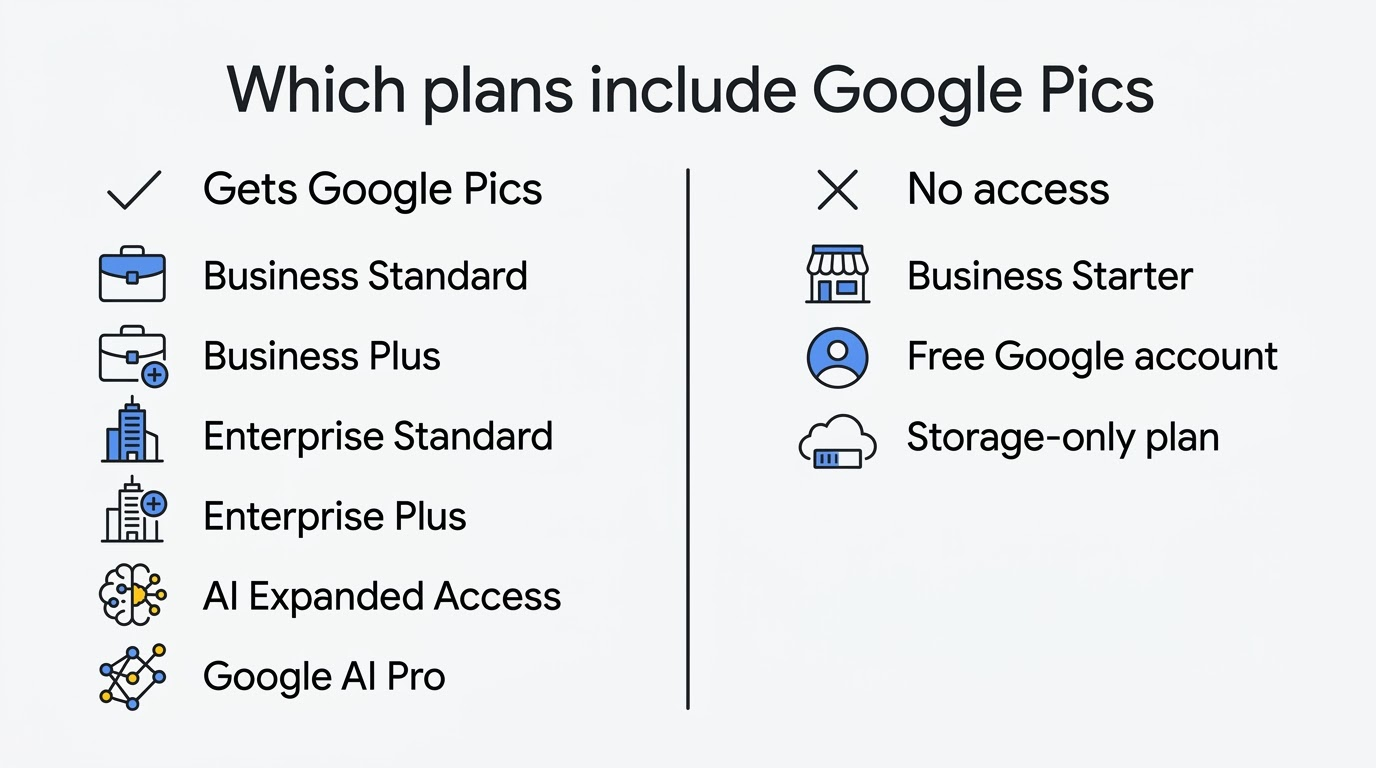
Business Starter is not on the list, and neither is a free Google account. The availability article in Docs Editors Help is the source of record for that list, and our pricing page explains what each route costs and how the add-on works.
The rollout schedule
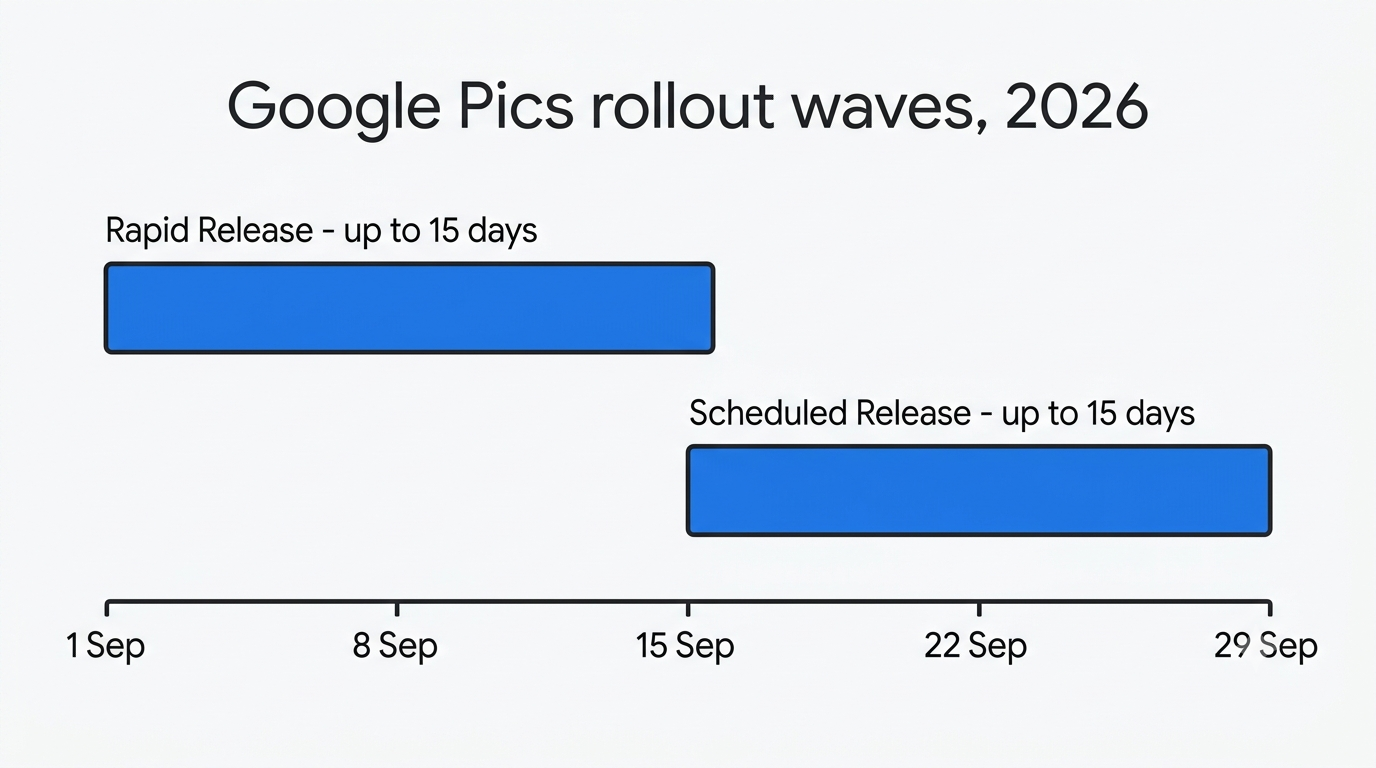
Google shipped the editor in two waves, matching the standard Workspace release tracks. Domains on Rapid Release get features first; domains on Scheduled Release get them roughly two weeks later, which gives administrators time to prepare.
| Release track | Rollout starts | Time to full visibility |
|---|---|---|
| Rapid Release domains | 1 September 2026 | Up to 15 days |
| Scheduled Release domains | 15 September 2026 | Up to 15 days |
Both waves are gradual rather than instant. Within a single domain, some users can see the editor while colleagues on the same plan do not, and that is expected behaviour during the fifteen-day window rather than a fault.
The one dated feature still outstanding is broader Drive integration. Editing almost any image stored in Google Drive with a single click was described at launch as arriving “in the coming weeks”, without a firm date, so its absence today is not a sign that anything is misconfigured.
Why Don’t I Have Google Pics Yet?
An eligible plan is no guarantee that the Google Workspace AI image editor is in your account today. It almost always comes down to one of five causes, and most reports of a “missing” Nano Banana editor trace back to one of them. Work through them in order.
Your rollout window has not closed. If your domain is on Scheduled Release, provisioning only began on 15 September 2026 and can take a further fifteen days to reach every account. Rapid Release domains started two weeks earlier, on 1 September 2026, but the same fifteen-day window applies there too. Nothing to do but wait, and check the rollout table above against today’s date before assuming something is broken.
Your plan is not on the eligible list. A free Google account, a storage-only Google One subscription, or a Workspace domain on Business Starter will never show the editor, however long you wait. This is the second thing to check because it is the one that never resolves itself — no amount of waiting fixes an ineligible plan, and the fix is an upgrade, not patience.
Your administrator turned it off. The product ships on by default, but it can be disabled for the whole domain, for one organisational unit, or for a group. If colleagues in another department have it and you do not, this is the likely explanation, and the next section covers exactly where that switch lives.
You are signed in to the wrong account. Access is tied to the account, not to the browser profile, so a personal account opened alongside a work account can easily be the one you are testing. Check the avatar in the top right before concluding anything, especially if you routinely keep several Google accounts open in the same browser.
You are a personal account in Germany. Personal accounts in Germany are the single stated geographic exception, and no rollout wave changes that. A Workspace domain based in Germany is not affected — the exclusion is written specifically against personal accounts, a distinction covered in more detail below.
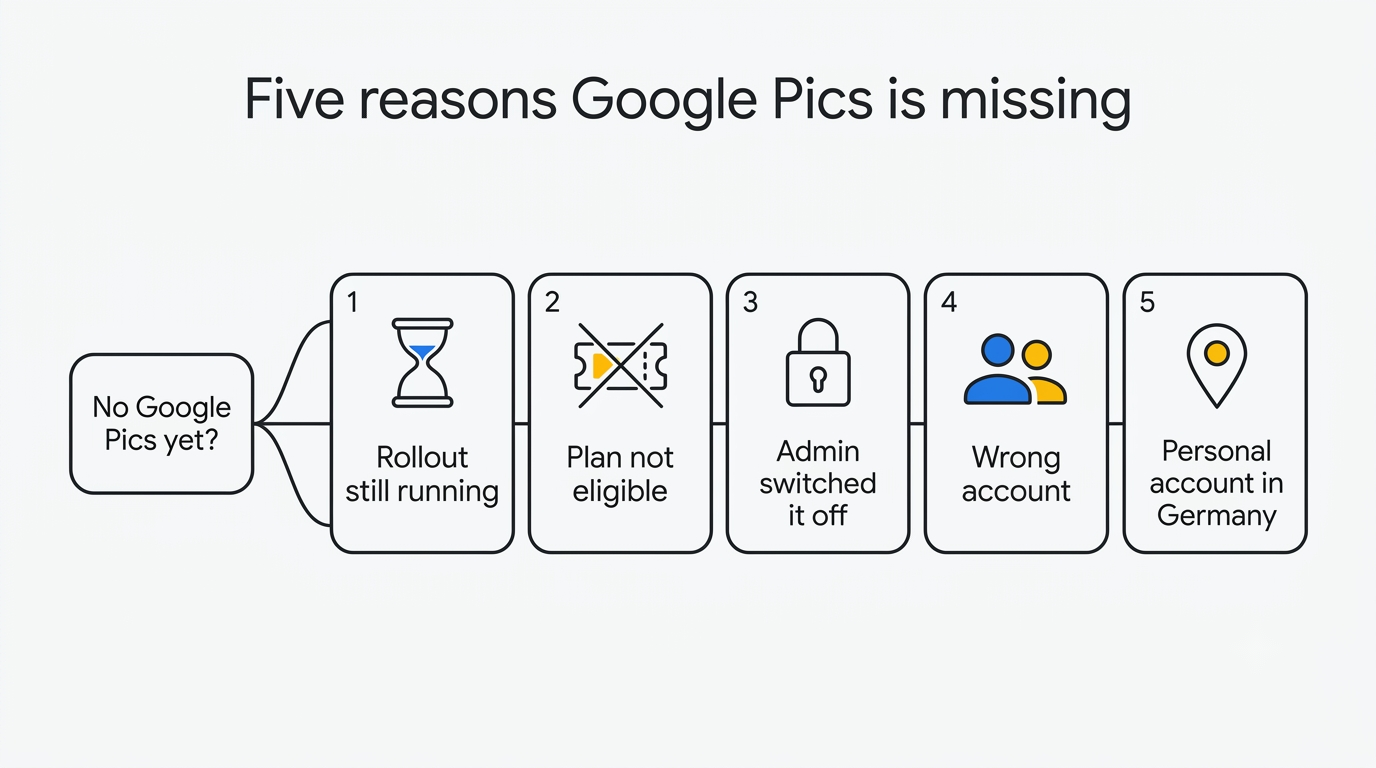
If none of the five apply and the rollout window for your track has genuinely closed, the fix is to contact Workspace support directly rather than keep testing.
What admins control
For anyone managing a Workspace domain, the governance model is simple and worth reading carefully, because the default is permissive.
This product will be ON by default and can be disabled at the domain/OU/group level.
Google Workspace Updates
The toggle lives in the Admin console alongside the other Workspace service settings, and it can be applied to the whole domain or scoped to a single organisational unit or group — the admin guide Turn Google Pics on or off for users walks through it. In other words, no one has to opt in. Every eligible seat receives an image generator that writes files into Google Drive and supports link sharing, from the moment the rollout reaches them. Where that is a problem — regulated content, brand approval workflows, client contracts that restrict AI-generated imagery — turning it off is a deliberate act somebody has to remember to perform.
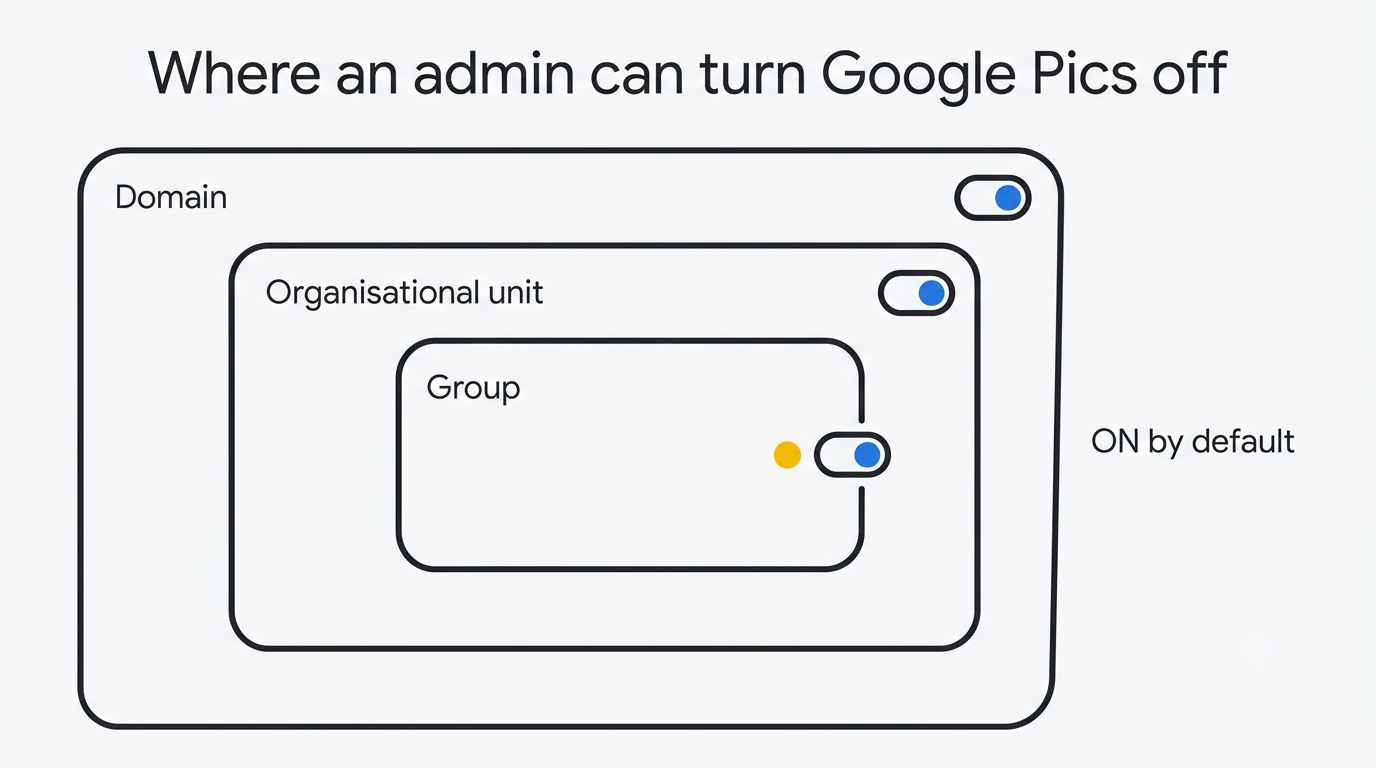
Scoping by organisational unit is the useful middle path: give the marketing and design units the editor, leave finance or legal without it, and revisit later. Because it is generative content stored in Drive, it also belongs in the same conversation as your existing Drive sharing and retention rules rather than being treated as a separate tool. More on how it sits inside the suite is on our Workspace integration page.
Countries and languages
Geography is unusually simple here. Google states that the editor is available in all countries and regions that support Google Workspace accounts, with a single exception: personal accounts in Germany.
Generation and editing are supported in 29 languages, including English, Spanish, French, German, Chinese and Japanese, alongside other European, Asian and Middle Eastern languages — the supported languages list for Google Workspace with Gemini is the authoritative reference if your language is not among those examples. That language list covers the prompts and edits you write, and it matters more than usual because one of the editor’s headline tricks is rewriting and translating text inside an image while preserving its typography.
Note the distinction: German as a working language is supported everywhere, while the exclusion is written specifically against personal accounts in Germany. Google’s wording does not extend that exception to Workspace domains there.
How to check your access
- Sign in to the exact account you intend to use, and check the avatar in the top right rather than assuming.
- Open pics.new. If the editor opens, you are done.
- If it does not, confirm your subscription: an AI plan in Google One for personal accounts, or the Workspace edition for work accounts.
- Ask your administrator whether the product has been disabled for your domain, organisational unit or group.
- Check the date against the rollout table above, allowing the full fifteen days after your track’s start date.
- If your plan qualifies, your admin has it enabled, and the window has passed, contact Workspace support with your domain and account details.
Once you are in, the difference between the standalone editor and the version that appears over a document is worth knowing before you start — our getting started guide and the walkthrough of editing images inside Docs and Slides cover both. And if you arrived here expecting a photo library rather than an image editor, read Google Pics versus Google Photos first, because they are unrelated products.
Related reading: what the editor can do and the general FAQ.
Official sources
- Google Workspace Updates rollout post
- Google Pics availability in Docs Editors Help
- Supported languages for Google Workspace with Gemini
- Turn Google Pics on or off for users — Workspace Admin Help
- Google Pics announcement on the Google blog
- Google Workspace product announcement
- Google Workspace pricing
- Google AI plans on Google One
- pics.new